1
 2
 3
 4
 5
 6
 7
 8
 9
10
11
12
13
14
15
16
17
18
19
20
21
22
23
24
25
26
27
28
29
30
31
32
33
34
35
36
37
38
39
40
41
42
43
44
45
46
47
48
49
50
51
52
53
54
55
56
57
58
59
60
61
62
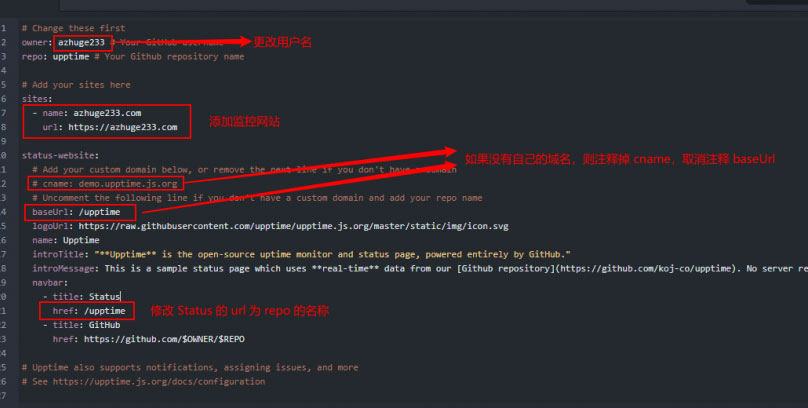
| # Change these first
owner: iwyang # Your GitHub organization or username, where this repository lives
repo: check # The name of this repository
sites:
- name: 01Bore's Notes
url: https://bore.vip
- name: 05Takagi
url: https://lixingyong.com
- name: 10大大的小蜗牛
url: https://eallion.com
- name: 11guole's Blog
url: https://guole.fun
- name: 12cywhat’s blog
url: https://cywhat.cn
- name: 13Akilarの糖果屋
url: https://akilar.top
- name: 17张洪Heo
url: https://blog.zhheo.com/
- name: 19Sianx's Blog
url: https://siax.cn
- name: 20Leonus
url: https://blog.leonus.cn/
- name: 22六月长河
url: https://kingpo.vercel.app/
- name: 23枫叶
url: https://blog.aqcoder.cn/
- name: 27lyshark
url: https://www.lyshark.com/
- name: 28mao
url: https://meuicat.com/
- name: 30我不是咕咕鸽
url: https://blog.laoda.de/
- name: 31CWorld Site
url: https://cworld.top/
status-website:
# Add your custom domain name, or remove the `cname` line if you don't have a domain
# Uncomment the `baseUrl` line if you don't have a custom domain and add your repo name there
# cname: demo.upptime.js.org
baseUrl: /check
logoUrl: https://raw.githubusercontent.com/upptime/upptime.js.org/master/static/img/icon.svg
name: Upptime
introTitle: "**Upptime** is the open-source uptime monitor and status page, powered entirely by GitHub."
introMessage: This is a sample status page which uses **real-time** data from our [GitHub repository](https://github.com/upptime/upptime). No server required — just GitHub Actions, Issues, and Pages. [**Get your own for free**](https://github.com/upptime/upptime)
navbar:
- title: Status
href: /check
- title: GitHub
href: https://github.com/$OWNER/$REPO
# Upptime also supports notifications, assigning issues, and more
# See https://upptime.js.org/docs/configuration
workflowSchedule:
graphs: "0 0 * * 0"
response-time: "0 0 * * 0"
site: "0 0 * * 0"
summary: "0 0 * * 0"
update-template: "0 0 * * 0"
updates: "0 0 * * 0"
uptime: "0 0 * * 0"
|